
The Deployment Discipline
| Home | Phases | Disciplines | Milestones | Roles | Deliverables | Guidance | Help |
|
|
The Deployment Discipline |
|
||||||||
|
||||||||||
The goal of this discipline is to plan for the delivery of the system and to execute the plan to make the system available to end users.
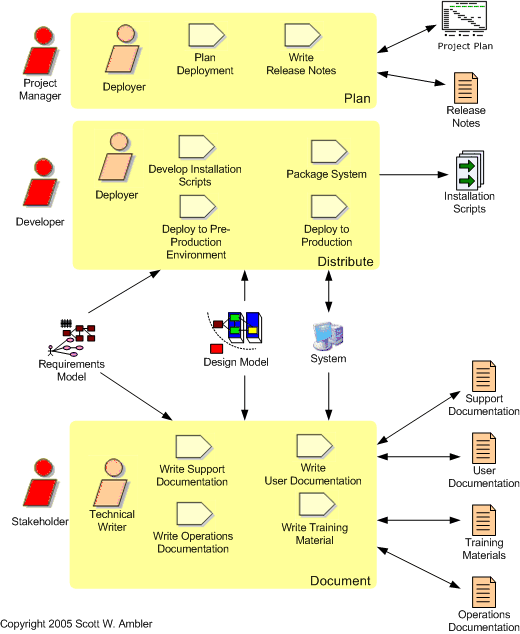
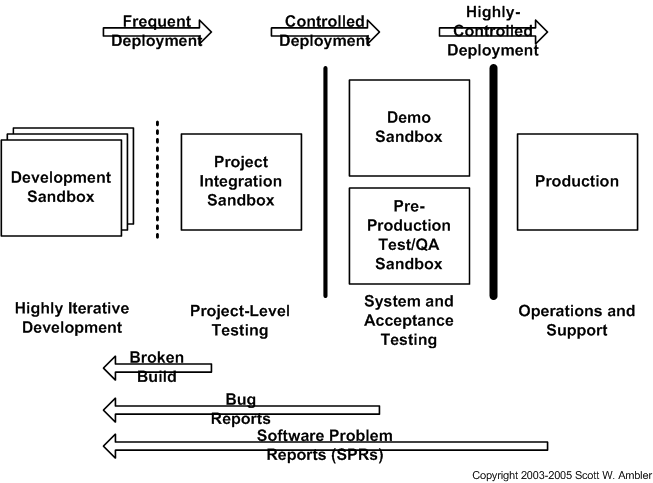
Figure 1. Sandboxes.
| Phase | Activities |
| Inception | Identify the potential release window. For
example, you may be required to deliver your software before the end of
the year but after the release of another application that is planned to
go into production at the end of September. Therefore your release
window is between October 1st and December 31st,
but you may decide to be conservative and set it to be between November
1st and December 15th to take into account deployment problems with the
other project and the holidays at the end of December. Defining
your release window early in the project helps you in your project
planning efforts. Begin high-level deployment planning. This effort will focus on initial release planning for your system, identifying your deployment audience, and identifying your potential release window. Your main goal should be to determine a general deployment strategy: based on your understanding of your project, does it make sense to release the software all at once or as phased releases? Because you won't have finalized your architectural strategy yet, you may decide to begin deployment planning during the Elaboration phase instead. |
| Elaboration | Update your deployment plan. An important part of defining your architecture is defining the deployment configurations for your system, perhaps you will support a three-tier client/server configuration for internal users connected to your network, an HTML-based interface for Internet usage, and a stand-alone single user version for disconnected users. Each individual deployment configuration could be documented with some form of deployment model that defines how the actual software components are organized and deployed to hardware components. Understanding the configurations will help you to identify the different types of installations you'll have to do, which in turn should provide insight into the overall deployment effort. |
| Construction | Develop (de)installation scripts. As you develop the
system you should also write, and test, the
installation and
de-installation scripts required to deploy it into your pre-production
testing environment. This scripts should be written so that you
can simply reconfigure them to deploy into production. Develop release notes. Your release notes should summarize the "good things to know" about the current release of the system which you're building. Point form notes are likely sufficient for now. Develop initial documentation. In addition to delivering working software, you will also need to deliver system documentation (operations, support, system overview, and user documentation), as well as your training materials. If you're creating new documents then you can at least begin to define their structure and add point form notes to them. You do not want to put much work into the documents now because your system is still evolving. Update your plan. As development of the system progresses, so should your deployment plan. You will likely find that you need to negotiate your deployment plan with your operations and support departments, as well as with other projects that are also planning on deploying software, so that your project fits into your overall corporate system deployment plan. Deploy the system into pre-production environments. You should regularly deploy your system into pre-production environments for QA/testing as well as for demonstrations to your stakeholders. The more experience you get doing this the easier your actual deployment into production is likely to be. |
| Transition | Finalize the deployment package. To finalize the packaging of your
software you need to define its deployment baseline, a
configuration
management activity, and you need to perform a "final" build the
software, an Implementation workflow task.
Finalize documentation. The majority of the system documentation (operations, support, system overview, and user documentation) is typically written during this phase because the system's functionality has stabilized. Announce the deployment. You should announce the anticipated deployment schedule including the expected training and installation dates. You need to train your operations, support, and user communities as appropriate during this phase. Train people. Training your project customers – users, management, operations staff, and support staff – is always an important part of deployment. Remember that your customers may need training beyond that of learning how to work with your application. For example, this may be the first time that some users are working with a PC, a browser, or even a mouse. Similarly, this may be the first time that your operations staff is working with a new technology that your system users, such as an EJB application server, and therefore will need to be trained and educated in that technology to qualify them to work with your system. Deploy the system into production. At this point you will perform any required data conversion, which may be a one-time batch job or a gradual conversion of the data as it is needed by your users. You may decide to run your new system in parallel with your existing system for several weeks to ensure that it actually works in production. You may also choose to deploy your system to a subset of your user community, called a pilot release, to verify that it runs for the smaller group before you choose to "inflict" your system on everyone. You may also need to deploy a version of your software to the support department so they can simulate production problems when users contact them for help. |
 |
Page last updated: September 25, 2005 This page is tailored with permission from Ambysoft Inc.'s Agile UP Product Original page is Copyright © 2005 Ambysoft Inc. |